
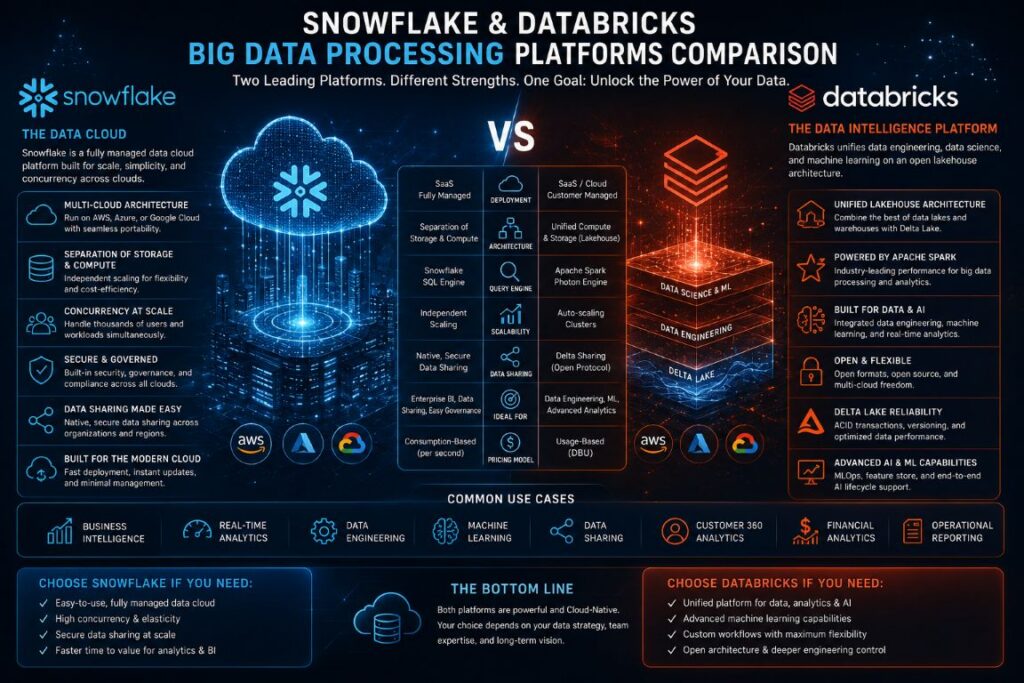
Summary of the Article
- Snowflake and Databricks are two platforms that solve different problems. Snowflake is great for cloud analytics and BI, while Databricks is perfect for data engineering, machine learning, and AI workloads.
- They have different architectures: Snowflake separates storage and compute, while Databricks uses an open lakehouse model powered by Delta Lake and Apache Spark.
- Choosing a platform that doesn’t fit your team’s skills can cost you months of productivity. The SQL vs. Python divide is more significant than most comparisons suggest.
- Many enterprise teams use both platforms in a hybrid setup, which makes a strong technical case.
- Their pricing models are different, and understanding Snowflake’s credit system versus Databricks’ DBU structure can save your organization thousands of dollars each year.
Choosing between Snowflake and Databricks is a significant infrastructure decision for a data team.
While both platforms are truly remarkable, they are each designed for different tasks. Snowflake is a data warehouse built for the cloud, designed for quick SQL analytics and smooth scalability. Databricks, on the other hand, is a unified data platform built on Apache Spark and is designed for data engineering pipelines, machine learning, and end-to-end AI development. Treating them as interchangeable could lead to the wrong choice for your organization. Teams seeking expert guidance on navigating the complexities of modern data infrastructure can find valuable resources and commentary through platforms like data analytics specialists, who monitor these ecosystems closely.
This comparison is designed to help you sift through the hype and provide you with the technical details you need to make an informed decision.
Comparing Snowflake and Databricks: Two Titans, One Decision
Both platforms were born out of the understanding that traditional on-premise data warehouses were not able to keep up with the needs of today’s cloud data. However, the routes they took were quite different — and these differences dictate everything about how you’ll use them.
Snowflake: The Data Warehouse for the Cloud
Snowflake was founded in 2012 with one goal in mind: to make data warehousing in the cloud simple, quick, and incredibly scalable without the complications of infrastructure. They achieved this through a multi-cluster shared data architecture that completely separates storage from computing. You can query data stored in cloud object storage (AWS S3, Azure Blob, or Google Cloud Storage) using independent virtual warehouses that can be spun up and down as needed. The result is a platform that SQL analysts can immediately feel comfortable with and that can handle complex data sharing across organizations natively.
Databricks: A Unified Analytics and Machine Learning Platform
Databricks was started in 2013 by the original founders of Apache Spark from UC Berkeley. While Snowflake made the warehouse simpler, Databricks expanded the field of play. They introduced the idea of a data lakehouse — an architecture that combines the inexpensive storage of a data lake with the performance and dependability of a data warehouse. Their open-source storage layer, Delta Lake, adds ACID transactions, schema enforcement, and time travel to raw lake storage. For teams that build machine learning models, orchestrate complex pipelines, or process streaming data at scale, Databricks offers depth that Snowflake wasn’t built for.
The Importance of Making the Right Decision
Choosing the wrong platform doesn’t only impact performance benchmarks, but it also affects team productivity, hiring, toolchain complexity, and long-term costs. If a SQL-first analytics team is forced to use Databricks, they will face a steep learning curve with PySpark. On the other hand, a data science team that is forced to use Snowflake will constantly be limited by its machine learning capabilities. Making the right choice from the beginning can have a positive impact on every data initiative that your organization undertakes.
Key Architectural Differences
It’s not just a matter of technicalities when it comes to architecture. It’s the heart of why these platforms perform differently when faced with real tasks. By getting to know the architectural choices each platform has made, you’ll be able to pinpoint their strengths and weaknesses.
How Snowflake Separates Storage and Compute
Snowflake’s design consists of three separate layers: a centralized storage layer, a multi-cluster compute engine, and a cloud services layer that manages metadata, security, and query optimization. The data is stored in a compressed, columnar format in cloud object storage. The compute process is handled by virtual warehouses — independent clusters that can query the data without having to compete for resources. This allows 10 teams to run 10 separate workloads at the same time on the same data without any resource contention. To scale up, all you have to do is resize a virtual warehouse from XS to 4XL in a matter of seconds, with the costs scaling in a proportional manner.
Databricks’ Lakehouse Architecture and Delta Lake
Databricks operates on a fundamentally different model. Instead of maintaining a proprietary storage format, it uses Delta Lake — an open-source storage layer that sits on top of cloud object storage and adds reliability features that were previously only available in dedicated warehouses. Delta Lake brings ACID transactions, scalable metadata handling, unified batch and streaming processing, and schema evolution to raw data lake storage. The compute layer runs on Apache Spark clusters, which are purpose-built for distributed data processing at scale. This architecture gives Databricks extraordinary flexibility — the same platform ingests raw data, transforms it, trains ML models on it, and serves predictions from it.
Comparing the Scalability of Each Platform
Snowflake is known for its ability to scale with ease and predictability when it comes to analytical query workloads. Thanks to its multi-cluster architecture, adding compute capacity is as simple as making a configuration change, not a full-blown infrastructure project. Databricks, on the other hand, offers more granular control over scalability — with cluster configurations, node types, autoscaling policies, and Spot instance usage, engineering teams have precise control over cost and performance. Both platforms are capable of scaling massively, but reaching optimal throughput with Databricks requires more deliberate configuration.
Comparing Query and Analytical Performance
Many comparison articles don’t go into detail about raw performance. So, let’s look at what the architecture really means when it comes to executing queries.
Who’s the Best for Simple Aggregations and Filters?
When it comes to basic analytical queries, like GROUP BY aggregations, filtered scans, and simple joins across large tables, Snowflake consistently delivers quick and reliable results. Its cloud services layer automatically handles query optimization, micro-partition pruning, and result caching. If you run the same query twice, the second result will be returned from the cache almost instantly, and you don’t need to configure anything. This makes Snowflake a great option for analytics and BI teams who need reliable performance but don’t have tuning expertise.
When comparing Snowflake and Databricks in terms of workload type, we can see that:
- Both platforms perform well with simple aggregations, with Snowflake offering excellent out-of-the-box performance and Databricks performing strongly with the Photon engine enabled.
- Snowflake is best-in-class for ad-hoc SQL queries, while Databricks performs well but requires a SQL Warehouse.
- Databricks is a native strength for batch ETL processing, while Snowflake is capable but this is not its primary strength.
- Databricks offers high-throughput native streaming ingestion, while Snowflake supports this but with lower throughput.
- Databricks offers end-to-end native support for ML model training, while Snowflake has limited native support.
The Photon engine from Databricks, a vectorized query engine written in C++, has significantly reduced the SQL performance gap. This makes running analytical queries on the same platform a viable option for teams already running Databricks pipelines, without the need to switch tools.
Handling Complex Joins and Window Functions: A Comparison Between Snowflake’s SQL Optimizer and Databricks’ Photon Engine
When it comes to handling complex multi-table joins and window functions, the architectural choices of a data processing platform become evident in the query times. Snowflake’s SQL optimizer is capable of managing these workloads with automatic statistics, join reordering, and dynamic partition pruning, all without the need for manual intervention. Thanks to Snowflake’s columnar storage and micro-partition architecture, window functions across billions of rows are executed efficiently.
Photon, Databricks’ engine, can manage these workloads quickly when set up correctly, but that’s the catch. To get the most out of Databricks on complex SQL workloads, you need to understand cluster sizing, shuffle partitions, and broadcast join thresholds. For data engineers familiar with Spark, this is a benefit. For SQL analysts who are used to the simplicity of Snowflake, it’s a hindrance.
When it comes to the complexity of queries, Snowflake and Databricks both have their own unique advantages. For multi-table joins, Snowflake has automatic optimization, while Databricks has a higher manual tuning ceiling. For window functions, Snowflake offers consistent speed, while Databricks is photon accelerated. When it comes to query result caching, Snowflake has native, automatic capabilities, while Databricks requires Delta caching setup. For concurrent users, Snowflake offers multi-cluster auto-scaling, while Databricks has configurable cluster pools.
One of the biggest differences between the two platforms is their streaming vs. batch processing capabilities. Databricks is designed for streaming. Its Structured Streaming API, which is built on Spark, can handle high-throughput real-time data ingestion natively. This means it can handle millions of events per second from Kafka topics feeding directly into Delta Lake tables with exactly-once semantics and automatic checkpointing.
Snowpipe is Snowflake’s continuous data ingestion service that supports streaming and handles moderate streaming volumes well. But if you’re an organization with serious real-time requirements such as IoT sensor data, high-frequency clickstreams, or financial transaction monitoring, Databricks’ native streaming capabilities can offer you significantly higher throughput and lower latency.
When it comes to batch processing, both platforms are evenly matched. They both can handle large-scale batch transformations effectively. Snowflake’s simplicity makes it easy to write and maintain batch ELT pipelines. Databricks, on the other hand, gives you more control over execution plans and resource allocation for extremely large batch jobs. This can be crucial when you’re processing petabyte-scale datasets on a tight schedule.
Integration and Data Ingestion Ecosystem
The usefulness of a data platform is determined by the data you can input and how well it integrates with the tools your team is already familiar with. Both platforms have made significant investments in their integration ecosystems, but with differing priorities.
Integration Ecosystem
One of the biggest strengths of Snowflake is its ability to connect with almost every major data pipeline tool. Snowflake can natively integrate with tools like Fivetran, dbt, Airbyte, Informatica, Talend, and Matillion. The Snowflake Partner Network is a network of hundreds of certified integrations. This means that most enterprise data stacks can integrate with Snowflake with very little custom engineering. This is a major advantage for organizations that are standardizing on a modern data stack.
Since the launch of Unity Catalog and its enterprise adoption drive, Databricks has made considerable progress in its connector ecosystem. Real-time ingestion is made easy with native integrations with Apache Kafka, AWS Kinesis, Azure Event Hubs, and Google Pub/Sub. Databricks is also natively supported by dbt, which is a significant advantage for teams that already use dbt for transformation logic. In recent years, the gap in support for third-party tools has significantly reduced, although Snowflake still has a small advantage in terms of the range of certified integrations.
Databricks has a clear advantage in its capacity to natively ingest and process unstructured and semi-structured data. It doesn’t require a schema upfront to accommodate raw JSON, Parquet, Avro, ORC, images, and binary files in Delta Lake. Snowflake does well with semi-structured data via its VARIANT data type and native JSON flattening, but it’s built for structured relational workloads. If you’re dealing with high volumes of raw, disorganized, mixed-format data, Databricks’ ingestion model is a better fit.
BI Tool Compatibility: Snowflake’s Wide Compatibility vs. Databricks’ JDBC Development
Snowflake is compatible with a wide range of business intelligence tools. Tableau, Power BI, Looker, Qlik, Sisense, ThoughtSpot, and MicroStrategy all offer native or optimized Snowflake connectors. Its ANSI SQL compliance and standard ODBC/JDBC connectivity make it compatible with virtually any BI tool that uses SQL, without the need for complex configuration. This makes it the default choice for organizations where the primary users of data are business analysts and executives who use dashboards.
Databricks has made major strides in its BI compatibility with the introduction of Databricks SQL. This dedicated SQL query interface comes with its own serverless warehouses that are optimized for BI workloads. Now, Tableau, Power BI, and Looker can connect to Databricks SQL using performant JDBC/ODBC drivers. However, some BI tools still treat Databricks as a secondary integration compared to Snowflake. Plus, the SQL Warehouse setup adds a layer of configuration that Snowflake handles behind the scenes. For pure BI use cases, Snowflake is still the more seamless option.
Artificial Intelligence and Machine Learning Features
When it comes to this area, the two platforms differ significantly — and your organization’s data maturity and objectives should play a major role in your decision.
Machine Learning Infrastructure in Snowflake Without Native ML
Snowflake has been slowly incorporating ML capabilities with features like Snowpark. Snowpark allows Python, Java, and Scala code to be run directly within the Snowflake environment using the same compute infrastructure as SQL queries. Snowpark ML provides a preprocessing API and model registry, and Snowflake Cortex adds LLM-powered functions for text analysis and summarization. While these are significant additions, they are more of an infrastructure layer for ML rather than a complete end-to-end ML development environment. Teams that are serious about model training still need to incorporate their own MLflow tracking, feature stores, and experiment management tooling from outside the platform.
What Makes Databricks’ Machine Learning Workflow Stand Out
Databricks is essentially the go-to platform for data scientists and machine learning engineers when they’re looking to build machine learning systems for production. MLflow — the open-source machine learning lifecycle management tool that Databricks originally created — is seamlessly integrated for tracking experiments, versioning models, and deployment. The Feature Store allows teams to define, share, and reuse features across different models. AutoML takes care of generating baseline models automatically. Additionally, with Databricks Runtime for Machine Learning, you can train across GPU clusters using PyTorch, TensorFlow, or XGBoost as a primary feature, not something tacked on as an afterthought. The entire workflow from ingesting raw data to serving the model can exist on a single platform without the need to move data between systems. For insights on how companies are leveraging AI in their operations, check out AI token budgeting insights from Box CEO.
Which Platform Is Better at Handling Unstructured Data?
Databricks is significantly better at handling unstructured data than Snowflake. Images, audio files, PDFs, raw text corpora, and binary formats are all stored natively in Delta Lake and can be processed via Spark’s distributed computing engine or fed directly into deep learning pipelines. Snowflake’s architecture is optimized for tabular, structured data — while VARIANT columns handle semi-structured JSON well, processing true unstructured data requires moving that data outside of Snowflake. For organizations building computer vision pipelines, NLP systems, or multimodal AI applications, Databricks is the obvious choice.
Security and Data Governance
Security and governance have become top-of-mind issues for enterprise data teams. While both platforms have robust security frameworks, their governance models reflect their architectural philosophies in significant ways.
Classification, Tagging, and Access History in Snowflake
The governance model of Snowflake is built directly into the platform and does not require any additional configuration to activate core features. Object tagging is a feature that allows teams to classify columns and tables with sensitivity labels. This can be used to mark PII fields, financial data, or regulated information. These labels then flow through to access controls and data masking policies automatically. Snowflake also offers column-level security through Dynamic Data Masking. This feature allows sensitive fields like Social Security numbers or email addresses to be masked differently based on the querying user’s role, without duplicating the underlying table.
One of Snowflake’s features, Access History, records every query that interacts with a specific column, not just the table. This includes the user identity, timestamp, and query text. This level of detail is essential for HIPAA, SOC 2, and GDPR compliance frameworks. The Row Access Policies feature adds another layer of protection by filtering which rows a user can see based on their role or attributes when they make a query. These features are built into Snowflake’s single-platform environment, making governance easier for organizations that store most of their data in Snowflake.
Unity Catalog and Native Lineage Tracking by Databricks
The Unity Catalog is a unified governance layer from Databricks that was designed to provide consistent access control, auditing, and data discovery throughout the entire Databricks Lakehouse. Prior to the introduction of the Unity Catalog, governance in Databricks was disjointed, with different controls for tables, files, ML models, and notebooks. The Unity Catalog brings all of these together under a three-level namespace (catalog, schema, table) with centralized permissions that are propagated across workspaces, cloud regions, and data assets.
Databricks has a significant technical advantage in the area of native data lineage. The Unity Catalog can automatically track column-level lineage across SQL queries, notebooks, and workflows. This means it can trace how a column in a downstream table was created from upstream sources without the need for any manual documentation. This automatic, code-agnostic lineage tracking is more comprehensive than what Snowflake can provide natively and is essential for impact analysis when there are changes to upstream data.
Both platforms offer role-based access control, attribute-based access control, and row/column-level security. The key difference is in the scope: Snowflake’s governance is deep within its own ecosystem but doesn’t extend to data outside the platform. Databricks’ Unity Catalog governs data in open cloud storage, so your Delta Lake tables, ML models, and even external tables are all under the same governance umbrella. For companies with hybrid or multi-platform data architectures, this is a big operational advantage.
- Snowflake strengths: Automatic tagging policies, Dynamic Data Masking, column-level Access History, network policies, and tri-secret secure encryption
- Databricks strengths: Unity Catalog lineage tracking, cross-workspace governance, ML model governance, and open-format data governance beyond the platform boundary
- Shared capabilities: RBAC, SSO/SAML integration, end-to-end encryption at rest and in transit, VPC/private link support, and SOC 2 Type II certification
- Compliance readiness: Both platforms support HIPAA, GDPR, and PCI-DSS compliance frameworks at the enterprise tier
Cost Structure and Pricing Models
Cost is where both platforms can surprise organizations that don’t model usage carefully before committing. Neither Snowflake nor Databricks is cheap at enterprise scale — but their pricing mechanics are different enough that the more cost-effective choice depends heavily on your specific workload profile. For insights on how companies are managing costs in technology, consider reading about AI token budgeting insights.
Snowflake uses a credit-based pricing model that is linked to the size of the virtual warehouse and its runtime. They charge for storage separately at a flat rate per terabyte. This clear separation makes budgeting predictable — you know exactly how much storage will cost, and compute costs are determined by the size of the warehouse times the hours of active use. The downside is that idle warehouses still use credits if they are not correctly suspended, and large volumes of concurrent queries can quickly increase costs if multi-cluster auto-scaling is not properly managed. For more information on optimizing tech infrastructure, check out the Windows 11 Insider Preview update.
Databricks employs Databricks Units (DBUs), a unique unit of processing capacity that is consumed hourly, depending on the type of cluster and workload. The DBU rates differ depending on the type of workload: Jobs Compute, All-Purpose Compute, SQL Compute, and ML GPU Compute all have different DBU rates. The total cost of ownership calculations are made more complicated by the addition of cloud provider VM costs to DBU costs. However, Databricks’ support for cloud Spot instances (discounted preemptible VMs) can significantly lower compute costs for batch workloads that can withstand interruption.
Cost Factor Snowflake Databricks Pricing unit Credits (per second billing) DBUs + cloud VM costs Storage cost ~$23/TB/month (on-demand) Cloud provider object storage rates Idle cost risk High if warehouses not suspended Low with auto-terminating clusters Spot/preemptible support Not applicable Supported, significant savings Cost predictability High for stable workloads Variable, requires monitoring Free tier / trial $400 free credits trial 14-day free trial
Snowflake’s Credit-Based Pricing Model
Snowflake virtual warehouses are sized from X-Small to 6X-Large, with each size doubling the credit consumption rate. An X-Small warehouse consumes 1 credit per hour; a 6X-Large consumes 512 credits per hour. Credits are purchased upfront at contracted rates or consumed on-demand at higher per-credit prices. The auto-suspend feature is critical — a warehouse set to suspend after 60 seconds of inactivity stops billing almost immediately after query completion, which can dramatically reduce waste for intermittent workloads.
With Snowflake, you pay for serverless features like Snowpipe, automatic clustering, and materialized view maintenance separately from virtual warehouse credits, and they’re billed at Snowflake-managed compute rates. While this gives you a lot of granularity, it can make it more difficult for teams to accurately forecast their monthly costs. If you’re a large organization with predictable workloads, it can be worth making volume commitments to get enterprise agreements, which can significantly lower your per-credit costs compared to on-demand pricing.
Databricks: A More Detailed Cost Control for Advanced Users
Databricks provides more opportunities for cost optimization for developers than Snowflake, but it requires active management to use these opportunities. Instance pools reserve cloud VMs in advance, allowing clusters to start in a few seconds instead of a few minutes, which eliminates wasted time during startup in interactive workflows. Cluster policies set the boundaries of the organization by limiting the maximum size of clusters, setting automatic termination timeouts, and limiting the types of nodes, which prevents developers from accidentally starting expensive GPU clusters for regular SQL work. For insights into how AI can further enhance such cost optimization strategies, you might find AI token budgeting insights useful.
Spot instances are a great option for batch workloads. By utilizing AWS Spot, Azure Spot VMs, or Google Preemptible VMs for Jobs Compute clusters, you can cut your raw VM costs by 60–90% compared to on-demand pricing. Databricks is able to handle Spot interruptions with grace for most batch workloads via task retry logic. For lengthy ML training jobs, a mixed fleet of a single on-demand driver node and multiple Spot worker nodes provides a balance of cost savings and interruption resilience.
Practical Cost Considerations for Business Teams
The simple truth about cost is that Snowflake tends to be pricier for heavy compute workloads such as large-scale data transformation and ML training, but it’s easier to budget. Databricks can be a lot cheaper for teams with a lot of engineers who actively optimize cluster configurations and use Spot instances, but it requires more cost governance infrastructure to prevent uncontrolled spending. Most business teams that use both platforms report that Snowflake costs are more predictable from quarter to quarter, while Databricks costs are more closely related to workload intensity when well managed.
Comparing Snowflake and Databricks: Practical Applications
While comparing architectures and benchmark figures can provide some insight, they don’t paint the full picture. A more valuable indicator is knowing the kinds of businesses and teams that consistently derive the most benefit from each platform — and where mixed deployments have become the sensible standard for enterprises.
When to Choose Snowflake
Snowflake is the best option if your main users are business analysts, data analysts, and BI developers who are proficient in SQL. If your company’s data projects are focused on reporting, dashboards, ad-hoc analysis, and regulated data sharing across business departments or external partners, Snowflake’s simplicity and performance provide immediate benefits with minimal learning curve. It’s also the preferred option for companies that value governance and compliance from the start, or those in industries such as financial services and healthcare where audit trail requirements are a must from the get-go.
When to Choose Databricks
Databricks is a solid choice when your data team is comprised of engineers and data scientists who need to create and manage intricate pipelines, train machine learning models, and process streaming data at high volume. If your plans include production ML systems, real-time analytics, or large-scale data transformation tasks that SQL alone can’t manage efficiently, Databricks offers the depth and flexibility to carry out these tasks without running into platform limitations.
Databricks is most beneficial for organizations with large data engineering teams who are proficient in Python and Spark, companies that are developing AI-powered products, and organizations that handle a variety of data formats beyond neat relational tables. It’s also the go-to choice for teams that are already invested in the open-source ecosystem — MLflow, Delta Lake, and Apache Spark — and want their cloud platform to enhance rather than replace these tools.
- Choose Snowflake if: Your team is SQL-first, your primary use case is BI and analytics, you need frictionless data sharing, or you want enterprise governance with minimal setup
- Choose Databricks if: You’re building ML pipelines, processing streaming data at scale, running complex ETL transformations, or your team is engineering-heavy with Python and Spark expertise
- Consider both if: Your organization spans multiple data maturity levels — analytics teams and data science teams with different tooling needs operating on shared data assets
The reality is that neither platform is universally superior. The right call depends almost entirely on what your team is trying to accomplish and who is doing the work.
The Combined Approach: Operating Both Platforms Simultaneously
- Databricks for data engineering: Databricks takes care of raw ingestion, complex transformations, and ML feature engineering on Delta Lake
- Snowflake for the analytics layer: Snowflake receives clean, curated data for BI tools, dashboards, and business analyst consumption
- Delta Sharing protocol: Snowflake can directly query Delta Lake data via Databricks’ open Delta Sharing protocol, reducing the need for redundant data movement
- Separation of model serving: ML models trained in Databricks serve predictions that are stored in Snowflake tables for reporting, eliminating the need for complex bidirectional sync
This combined architecture is now quite popular among mature enterprise data organizations. Instead of forcing a single platform to do everything, teams allocate each platform the workload it is best suited for. Databricks takes care of the heavy lifting — ingestion, transformation, and model training. Snowflake handles the consumption layer where speed, simplicity, and BI tool compatibility are most important.
Running two platforms does indeed have operational overhead, but the tools to manage it have become more sophisticated. dbt can run transformations that target either platform. Data catalogs such as Alation and Atlan can connect to both. Cost monitoring tools like Apptio and Valo can track spending across both environments in unified dashboards. For organizations that have reached a certain level of data maturity, the hybrid model often produces better results than trying to make one platform cover all use cases.
The secret to making a hybrid approach work is having clear ownership boundaries. Teams that have problems with dual-platform setups usually do not have explicit decisions about which platform owns which data assets. Define those boundaries early and enforce them through data contracts and catalog governance, and the hybrid model scales cleanly.
Team Abilities and Learning Difficulty
Platform power is insignificant if your team can’t utilize it efficiently. The skills difference between Snowflake and Databricks is one of the most overlooked elements in platform choice decisions — and one of the most impactful once the implementation process starts.
SQL-First Teams: Snowflake’s User-Friendly Onboarding
Snowflake’s onboarding process for SQL users is impressively quick. A data analyst who is familiar with standard SQL can create high-quality Snowflake queries within hours of first use. The Snowflake web interface (Snowsight) is user-friendly, the documentation is comprehensive, and the conceptual model — databases, schemas, tables, virtual warehouses — aligns directly with concepts most analysts are already familiar with. Teams transitioning from Redshift or BigQuery typically report effective Snowflake usage within days, not weeks. For organizations that want non-engineering data professionals to quickly provide value, this onboarding speed is a significant competitive advantage.
Software Engineers and Data Scientists: Python and Scala Proficiency in Databricks
Databricks is a platform that caters to teams with a background in software engineering. Python developers, Scala engineers, and data scientists who are already familiar with distributed computing concepts will quickly feel at home. Notebooks, cluster management, and Spark APIs are all things they already know how to use. However, teams transitioning from purely SQL backgrounds may face some challenges. Concepts such as partitioning strategies, shuffle operations, lazy evaluation, and cluster sizing require a completely different way of thinking than SQL query optimization. Organizations considering adopting Databricks for teams without Spark experience should allocate a significant amount of time for training. It can take 4–8 weeks before teams are productively performing engineering-level tasks. This investment is worthwhile for the right use cases, but it should be planned for realistically from the outset.
Which Platform Should You Choose?
If your organization’s main data consumers are analysts and business users who need fast, reliable SQL analytics with minimal infrastructure management, choose Snowflake. If you’re building data pipelines, training ML models, processing streams, or need a unified environment for data engineering and data science, choose Databricks. If you’re a large enterprise with both analytics-focused and engineering-focused data teams working on shared data assets, running both platforms in complementary roles is not just viable — it’s increasingly the standard. The worst outcome is choosing a platform based on market positioning rather than workload fit. Be honest about what your team actually builds, who actually uses the data, and what your organization’s data ambitions look like in two years — then let that drive the decision.
Commonly Asked Questions
When comparing Snowflake and Databricks, the most frequently asked questions usually center around a few key decision-making factors, such as integration, cost, compatibility with BI, and machine learning capabilities. The answers provided below are straightforward and based on specific workloads, rather than being vague or overly diplomatic.
Before we delve into the details, it is important to note that both platforms are continuously evolving. Snowflake is adding more machine learning-adjacent features through Snowpark and Cortex, while Databricks is enhancing its SQL and BI capabilities through Databricks SQL and Unity Catalog. Therefore, the evaluations made today may change as both platforms improve and add new features at different rates.
Is It Possible to Use Snowflake and Databricks Together?
Yes, it is. In fact, many large corporations do just that. The most common integration pattern is to use Databricks for data engineering and ML workloads upstream, and then load the curated data into Snowflake for BI and analytics consumption downstream. Databricks’ Delta Sharing open protocol allows Snowflake to read Delta Lake tables directly, without having to duplicate all of the data, which simplifies the pipeline for organizations that use both platforms. The two platforms are not mutually exclusive, but rather complementary, and many large data organizations use them side by side, with clear boundaries of ownership.
Is Snowflake a Better Choice Than Databricks for Business Intelligence?
When it comes to pure business intelligence workloads, Snowflake has a significant advantage. Features like ANSI SQL compliance, native BI tool connectors, automatic query result caching, and multi-cluster concurrency handling make Snowflake a more seamless environment for dashboards and ad-hoc analyst queries. Databricks SQL has made great strides with the introduction of Photon-accelerated SQL Warehouses and improved JDBC/ODBC connectors for Tableau and Power BI. However, Snowflake is still the more natural choice for organizations where business intelligence is the main workload and SQL analysts are the main users of the platform.
Can Databricks Run SQL Queries Like Snowflake?
Yes, Databricks can run SQL queries through Databricks SQL, which provides a dedicated interface with serverless SQL Warehouses that runs ANSI SQL against Delta Lake tables. For most standard SQL workloads — such as SELECT statements, aggregations, joins, and window functions — Databricks SQL performs on par with Snowflake, especially when the Photon vectorized query engine is enabled.
The disparities become evident in the breadth of SQL feature support and operational simplicity. Snowflake’s SQL dialect includes more built-in functions for data transformation, semi-structured data handling, and time-series operations. Databricks SQL covers the standard well but occasionally requires workarounds for edge-case SQL patterns that Snowflake handles natively. For SQL-first teams, here’s where the practical differences surface:
When comparing Snowflake and Databricks, here are some key differences to consider:
- Snowflake natively supports QUALIFY for window function filtering, while Databricks requires a subquery workaround.
- The FLATTEN function in Snowflake handles nested JSON arrays more intuitively than Databricks’ LATERAL VIEW EXPLODE syntax.
- While Databricks SQL requires SQL Warehouse configuration, Snowflake’s virtual warehouses are simpler to provision for SQL users.
- Both platforms support CTEs, stored procedures, user-defined functions, and materialized views at the enterprise tier.
For engineers who are already comfortable in the Databricks environment, Databricks SQL is a productive SQL layer. However, for dedicated SQL analysts who are expecting a Snowflake-equivalent experience, there is a noticeable usability gap in specific areas that matters in day-to-day work.
Ultimately, Databricks can handle SQL for the majority of analytical tasks, but Snowflake was specifically built to prioritize SQL, and it’s this purposeful design that is evident in the aspects that matter most to dedicated SQL users.
Which Platform is More Budget-Friendly for Small Teams?
For small teams — usually fewer than 10 data professionals — Snowflake’s free trial ($400 in credits) and simple credit-based pricing make initial exploration low-risk. Small SQL-focused teams with moderate query volumes often find Snowflake’s auto-suspend feature keeps monthly costs very manageable because warehouses idle between queries. The operational simplicity also means less engineering time spent on infrastructure management, which has a real cost for small teams where everyone wears multiple hats.
For small engineering teams with heavy batch workloads and disciplined cluster management, Databricks can be more cost-effective, especially when using Spot instances for jobs-based computing. However, the configuration overhead necessary to optimize Databricks costs in a meaningful way requires Spark expertise that small teams may lack. For most small teams that don’t have a dedicated data engineer, Snowflake’s operational simplicity translates directly into a lower total cost of ownership, even if its per-query computing rates seem higher on paper.
Does Snowflake Possess Machine Learning Capabilities?
Yes, Snowflake has been developing machine learning capabilities, primarily through Snowpark and Snowflake Cortex. Snowpark lets Python, Java, and Scala code run directly within Snowflake’s compute infrastructure, allowing for data preprocessing and feature engineering without moving data off the platform. Snowflake ML offers a preprocessing API and a model registry for storing and versioning trained models. Cortex introduces LLM-powered functions such as text classification, sentiment analysis, and summarization that operate as SQL functions against text columns.
For companies looking to conduct lightweight ML work without adding a different platform, these features are truly beneficial. However, they fall into a different ML support category compared to Databricks. The ML features of Snowflake are best described as ML-adjacent infrastructure — useful for preprocessing, simple model training on moderate datasets, and applying pre-built LLM functions to structured data. For distributed model training across large datasets, deep learning, MLflow experiment tracking, hyperparameter tuning, and end-to-end MLOps pipelines, Databricks is still in a league of its own.
Here’s the bottom line: If your company is heavily focused on machine learning, Databricks is the platform you need. Snowflake’s machine learning capabilities are a nice addition to existing warehouse workflows, but they’re not meant to take the place of a dedicated machine learning platform. If you’re serious about machine learning, you should either use Databricks as your main platform or use Snowflake’s machine learning features as a handy extra, not a full-fledged solution.